
Advertisement
Features of this template :
- Responsive blogger template both of desktop and mobile view
- Support Template designer. You can edit the background image, font family, font size, font color and others in Template Designer
- Featured image slider with auto recent post per label
- Minimalist and clean design template
- Compatible with modern browsers
- 2 column template
- 3 column footer and more
* Don't forget to see update of Main Photo responsive Blogger template
I don't set up the menu navigation. You can create it as you want. for the search box and subscribe via email, it's a default from Blogger. You can add it from Layout section.
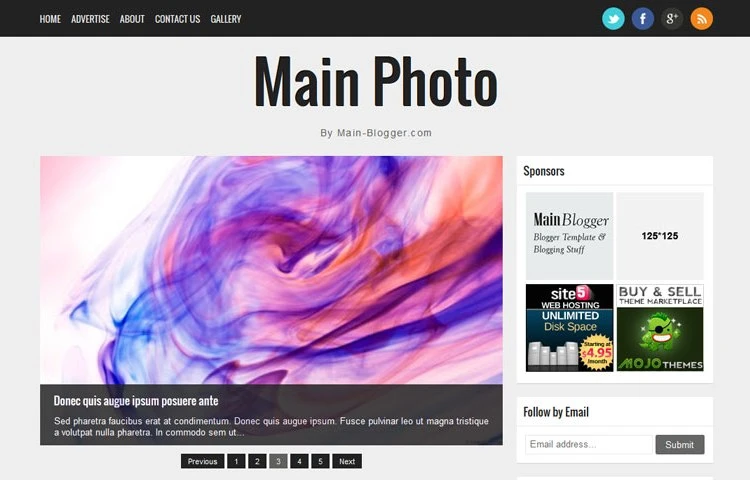
Responsive Blogger Template
Main Photo is a responsive Blogger template
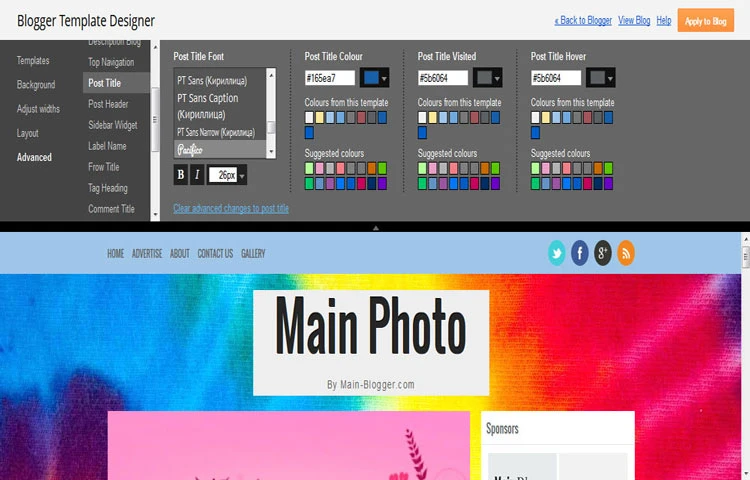
Template Designer
Easy to change in Template Designer
Setting Main Photo Responsive Blogger template
1. General setting
Before install this template, make sure to change the mobile view.
Go to Template > click the Gear icon > click Yes. Show mobile template on mobile devices. > choose Custom (please see the image below)
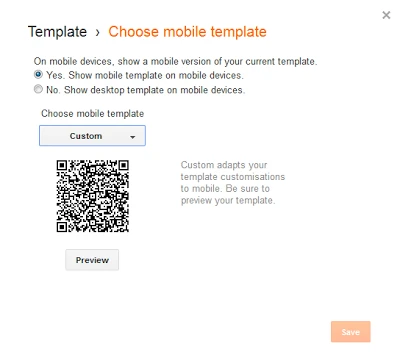
* this setting recommended if in your current setting for mobile view is No. Show desktop template on mobile devices
2. Setting Featured Image Slider
This template support image slider with auto recent post per label/category. You just need type the Label name in widget section.
Go to Layout > click "Edit" Looped Slider widget
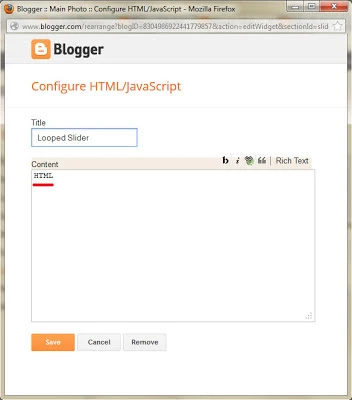
* Case sensitive. make sure you write correctly
3. Setting social networks
Go to Design > Edit HTML > Proceed and find this code below :
<div class='network'>

<ul>

<li><a href='https://twitter.com/ireng_ajah'><img alt='Twitter' src='/-xAYWEVyxvmM/Tpkdq4l1lNI/AAAAAAAALtk/FYlb2DxEcqE/s1600/twitter.webp' title='Main Blogger on Twitter'/></a></li>

<li><a href='https://www.facebook.com/MainBlogger'><img alt='Facebook' src='/-VOBRmsL8e6Y/Tpkdqs5VxOI/AAAAAAAALtI/z57Wppciv5c/s1600/facebook.webp' title='main Blogger on Facebook'/></a></li>

<li><a href='https://plus.google.com/111461490683022468168'><img alt='Google+' src='/-yA9nQkc9rSQ/Tpkdqk2-hKI/AAAAAAAALtQ/K0PjU7Z5tNs/s1600/gplus.webp' title='Main Blogger on Google+'/></a></li>

<li><a href='http://feeds.feedburner.com/mainbloggerz'><img alt='RSS Feed' src='/-i7NERqdQKP0/Tpkdq10lKqI/AAAAAAAALtY/TYmuUrKey9A/s1600/rss.webp' title='Subscribe RSS Feed Main Blogger'/></a></li>

</ul>

</div>
Replace :
4. Setting Menu navigation on Bottom
Go to Design > Edit HTML > Proceed and find this code below :
<div class='creditl'>

<ul>

<li><a href='/'>Home</a></li>

<li><a href='/p/about.html'>About</a></li>

<li><a href='/p/advertise.html'>Advertise</a></li>

<li><a href='/p/contact-us.html'>Contact Us</a></li>

</ul>

</div>
Replace :
5. Setting Banner Ad 125*125px
For perfect view, the structure of banner ad 125*125px should be like this
<ul class='ads'>

<li>YOUR_LEFT_BANNER_CODE_HERE</li> <!-- Left banner  -->

<li class='last'>YOUR_RIGHT_BANNER_CODE_HERE</li> <!-- Right banner  -->

</ul>
6. Setting Widget on Mobile
To display widget on mobile or/and desktop, you can add these codes
mobile='yes'

mobile='no'

mobile='only'
For example, you want to add Popular Post widget. Default Popular Post widget look like this :
<b:widget id='PopularPosts1' locked='false' title='Popular' type='PopularPosts'/>Then, you want to display on mobile too. So, the Popular Post widget code will be like this
<b:widget id='PopularPosts1' mobile='yes' locked='false' title='Popular' type='PopularPosts'/>For more detail, you can see on this post
- Demo Desktop
- Demo Mobile
- Download
* By downloading and using this template, you agree with our Term & License
* Don't forget to check the demo live on you mobile
This is really one of the best Blogger templates. I love responsive mobile friendly designs. We should really have more responsive blogger templates. Thanks for your great work.
ReplyDeleteMaybe you'r interested to show up in your blog? :D
DeleteJust added this template to our collection. Following you for more great templates...
DeleteNeat template. However I found two oddities. 1. YouTube-video in a post doesn't show on homepage, but does so on it's own post page. 2. Mobile version doesn't scale right, but is too wide with gadgets still on the right and not below like in preview examples.
ReplyDeleteThank you.
Delete1. this template is not support auto thumbnail from youtube (video)
2. i already checked with opera mini and everything is ok. if you check with OpMin, turn off the Single column view
1. Would be nice if YouTube-videos were displayed exactly the same way on homepage post list and individual post page. That way you could watch the video straight on homepage post list, instead of the confusing empty space it has now.
ReplyDelete3. Images on individual post page could have height set on auto to keep decent proportions.
Good work!
Thank you
Delete1. You can make it by click Revert widget templates to default then you can use a jump-link but you need a some css tweak for mobile view
2. yes, you right. maybe you can make a little change for that
thumbsup
ReplyDeleteehh.. aya kang Beben si Bolang nu kasep tea :D
Deletetemplatenya keren sob.. :)
ReplyDeleteI tried this template viewing on my iphone, it is not resonsive, the desktop version appears.
ReplyDeleteNice design though.
Have you check the demo live of this template on your iphone?
DeleteEverything is ok on my Galaxy and Nokia
bagus mas ireng :)
ReplyDeleteThis comment has been removed by the author.
ReplyDeleteHi Sara..
DeleteSetting slideshow is easy. Just go to Layot > click edit Looped Slider widget > type the Label name > Save
For example : This post have a label name Blogger Template. So, just type Blogger Template to the widget.
If your post doesn't have a Label name, you have give one
This comment has been removed by the author.
DeleteMay i know your blog?
Deletemake sure feed of your blog is Full
DeleteGo to Setting > Others > Site feed > choose Allow Blog Feed
This comment has been removed by the author.
DeleteThis comment has been removed by the author.
DeleteHi Sara..
DeleteI saw your blog and everything is ok. The slider is works now. I set Height of slider is auto. Maybe i will update this template for the slider to make everything is ok (not auto height)
I think you should edit the Header-wrapper width and height because your logo over into content (your logo size 920*184px)
Go to Template > Edit HTML and find this code
#header-inner {
max-width:430px;
width:100%;
max-height:130px;
height:100%;
margin:0 auto;
padding:0
}
Change the bold code with bigger value
Hello, Ireng ajah! I loved your template, it was exactay what I was searching for my blog! Thank you for sharing it!
DeleteI'm having the sabe problem as Sara. I can see just "previous" and "next" button of the slideshow... I checked all the points you said: feed status is OK, I put only one label name on the Looper Slider widget, I have the update template, and it still doesn't work... I'm doing some tests on a Tester Blogger. The address is: http://testevivatoscana.blogspot.it/
Could you please help me to adjust it? Thanks!
Hey!
ReplyDeleteThis is a very nice template. I compiled a list of top 10 templates for photography blogs on my site and I have featured this template on that.
Take a look at 10 Best Blogging Templates for Photography Blogs to know what position this template has secured and kindly leave a comment.
Happy Blogging,
Gireesh
For Kylie..
ReplyDeleteApologize. Your comment accidentally deleted
Please check Setting Featured Image Slider in post above or my answer for Sara's comment
It's working now :) but how do i put the date and share buttons in posts? It wont show. thank you!
DeleteFor share buttons :
DeleteGo to Template > Edit HTML and find this code
.date-header, .jump-link, .post-share-buttons {
display:none!important;
}
Delete the bold code
For Date
Go to Setting > Language and formatting > Timestamp Format. You can choose date format at there
share buttons are working but the date wont really show
DeleteHi Kylie..
DeleteMay i know your blog??
kyliego.blogspot.com
DeleteYou can set from Dashboard
DeleteGo to Setting > Language and formatting > Timestamp Format. You can choose date format at there
Yes Ive done that several times but its still not working. thanks!
DeleteHi I really love this template but I have a problem with the images that are showen in the post preview. The become to large so it looks bad, can I change this? http://fashion-nerdine.blogspot.de/
ReplyDeleteHi Yuna..
DeleteI set the height is auto but you can make a little change. Go to Template > Edit HTML and find this code below :
.entry-thumb {
width:100%!important;
}
Replace that code with this one :
.entry-thumb {
width:100%!important;
max-height:300px;
height:100%;
}
* you can change height value as you want
How do you change it so that the blog posts show a full posts not snippets on the homepage. I tried changing the html but couldnt figure it out.
ReplyDeleteHi Chris..
DeleteThis template use autoreadmore. Please wait for 1-2 days. I will make an update with default setting
Have you made that update? I want to change that too :(
DeleteHave you made that update? I want to change that too :(
DeleteHi Alexa..
DeleteApologize. Please check new update
http://www.main-blogger.com/2013/03/update-main-photo-responisve-blogger.html
hi, your template is fantastic.
ReplyDeleteis possible setting the preview text??
Hi Giovanni..
DeleteI don't understand with your question. can you give me more detail?
my site load the desktop version from mobile...
ReplyDeletehttp://blog.tancro.it
Go to Template > Click icon Gear. Choose Yes. Show mobile template on mobile devices.. In Choose mobile template, choose Custom
DeleteHi! Great template!
ReplyDeleteMy only problem: i want to crop the images in the post preview, not rescale them. With max-height:300px it will be scaled, and not cropped. Any tips?
Please check this post. It's a update version
Deletehttp://www.main-blogger.com/2013/03/update-main-photo-responisve-blogger.html
This comment has been removed by the author.
ReplyDeleteHi Sara :
Delete1 and 2. You can check the update version
http://www.main-blogger.com/2013/03/update-main-photo-responisve-blogger.html
3. Try these steps
#container{
margin-right:-280px;
float:left;
width:100%
}
/* === Main Wrap === */
#main-wrapper{
padding:0 20px 0 0;
margin:0 280px 0 0;
word-wrap:break-word;
overflow:hidden
}
Replace bold code with 0px
For sidebar, replace the current code with this one
#sidebar-wrapper{
width:280px;
float:right;
padding:0;
word-wrap:break-word;
overflow:hidden;
margin:0;
display:none;
}
I forget one question - how can I change the size of images in post? When I open a post - the size of image would look better in the same width as the text of post... do you know what I mean?
ReplyDeleteTry replace this code :
Delete.post-body img {
max-width:92%;
padding:5px;
border:1px solid rgba(34,34,34,0.1);
-webkit-box-shadow: 0 7px 5px -5px rgba(34,34,34,0.1);
-moz-box-shadow: 0 7px 5px -5px rgba(34,34,34,0.1);
box-shadow: 0 7px 5px -5px rgba(34,34,34,0.1);
}
With this one
.post-body img {
max-width:100%;
padding:0;
}
I have a same problem like Atelier. And I change code follow your guide. But have still an empty space left of the post. I mean how to show image in the same width as the frame of post like homepage.
DeleteYou need extra code
Delete.post-body img {
max-width:100%;
padding:0;
position:relative;
left:-20px
}
but remember, minimum image size must 660px
Thank for support. But I got 3 problems.
Delete1. I did what you said and the post image shown as I want. But the homepage doesn't show image like default, it has an empty space right of the post. How to image in the homepage and image in the opened post show in the same width like the frame of post.
2. Why do the posts have many image doesn't show thumbnail in the sidebar in widget "Popular posts"?
3. How to show header image like this blog: http://belatdat.blogspot.com/
Find this code
Delete.post-body img {
max-width:100%!important;
margin:0;
padding:0;
border:none;
-webkit-box-shadow:none;
-moz-box-shadow:none;
box-shadow:none;
}
Replace with this one
.post-body img {
max-width:100%!important;
margin:0;
padding:0;
border:none;
left:0;
-webkit-box-shadow:none;
-moz-box-shadow:none;
box-shadow:none;
}
2. try to setting from Popular widget. Layout > popular widget
3. you can upload your header image from Layout > header widget
Where do I change the image size on the detail page?
ReplyDelete...dave
Hey Author,
ReplyDeleteI really love this theme... Can you please tell me how do i extend the post to full width...there is a lot of empty space on both the sides of the blog.
Hey..
DeleteFor Main-wrapper, find this code :
#main-wrapper{
padding:0 20px 0 0;
margin:0 280px 0 0;
word-wrap:break-word;
overflow:hidden
}
For post body
.post-outer {
float:left;
background:$(post.background);
margin:0 0 20px 0;
padding: 0;
-webkit-box-shadow: 0 1px 1px rgba(34,34,34,0.1);
-moz-box-shadow: 0 1px 1px rgba(34,34,34,0.1);
box-shadow: 0 1px 1px rgba(34,34,34,0.1);
}
For post body at homepage
h2.entries-title {
line-height:normal;
text-transform:capitalize;
font-size:20px;
margin:0 0 10px 0;
font:$(post.title.font);
padding:0 20px;
}
.entry-meta {
font: $(postheader.font);
color: $(postheader.color);
margin:0 20px 20px 20px;
padding:0 0 20px 0;
border-bottom:1px solid rgba(34,34,34,0.1);
}
.entry-excerpt p{
clear:both;
margin:0 20px 10px 20px;
padding:0;
}
For post body at Single post
.post{
margin:0;
padding:20px;
}
Replace bold code as you want
Please who can help me with the settings button. After installing this temple, I can no longer see the settings in order to edit the template. Thanks in advance
ReplyDeleteLet me know about the problem
DeleteHi,
ReplyDeleteOn my mobile version my pictures which are side by side on my main site are distorted. How can I customise the mobile template to change this? http://travelistasister.blogspot.co.uk/
Thanks
Amy
Hi,
ReplyDeletethe mobile version of my site is distorting the images which are side by side using a table. http://travelistasister.blogspot.co.uk/
How can I customise mobile template to fix?
Hi!
ReplyDeleteI love your template and I'm testing the updated version for my photoblog!
Now, I've got 3 problems :
1.MAJOR trouble "No comments" -> There is nothing that allows to comment the posts ?!?! Yes, I checked the blogger parameters
2. What is the cleanest way to remove that last menu called "MainNavMenu" ?
3. What can I do in order to directly open a picture with lightbox from the main page (without having to open the post...) ?
Thank you !
Kieran
1. For Comment form, go to Setting > Posts and comments > setting in Comments section
Delete2. "MainNavMenu" ? I dont understand what the meaning of MainNavMenu
3. If you want to use the lightbox, you must install the template without autoreadmore.
Then, from Setting > Posts and comments > in "Showcase images with Lightbox", choose Yes
kenapa gak ada gambarnya di postingan saya?
ReplyDeleteknp gk ada gambarnya di blog saya?
ReplyDeleteAda 3 pilihan template yang bisa diinstal.
Delete1. Full versi dengan auto readmore
2. default versi dengan slider
3. default versi
coba di cek dulu, template mana yang diinstal. kalo instal template no 2 dan 3, tidak ada autoreadmore. bisa pake fasiliats Jump Link bawaan Blogger
Keren banget template nya gan, cocok buat photo blogging
ReplyDeleteplease help with my looped slider , when i first added a tag it worked fine but when i add more the slider dissappears . is their is a code or syntax to be added
ReplyDeleteThe slider only support with 1 tag/category. Choose the correct one for featured post :)
DeleteI have a problem. With screen resolution equal to or greater than 980 x 1280 not slide legends appear in some publications.
ReplyDeleteMy blog is: http://probandoblogsx.blogspot.mx/
ReplyDeleteHello! Why pages menu moves to the left side? How to repair this?
ReplyDeleteFor slider, please install new version
Deletehttp://www.main-blogger.com/2013/03/update-main-photo-responisve-blogger.html
For pages menu, you can arrange and drag in Layout
Wow!!. The update fixes the issues. I'm testing the template to implement it on my blog.Excellent! Great job. I love this template. Good job! Congrats! Thank you!
DeleteYou'r welcome
Deletenice templates
ReplyDeletePublished in http://www.responsivebloggertemplates.net/2013/06/main-photo-responsive-blogger-templates.html
Thank you
DeleteHi!
ReplyDeleteCan you tell me how to change the color of the "previous" and "next" buttons?
Thank you
Hi..
DeleteFind these codes :
.pagination a{
display:inline-block;
color:#fff;
background: #222;
padding:4px 10px 3px 10px;
line-height:normal;
margin:0;
font-size:11px;
}
.pagination a:hover,.pagination a.selected{
background: #61605e;
}
Replace bold code with you code
I tested this template and the mobile version looks the same as the web version
ReplyDeletethank you. I think i missed a code for mobile view
DeleteTry to add this code
<meta content='initial-scale=1,user-scalable=no,maximum-scale=1,width=device-width' name='viewport'/>
exactly after this code
<head>
Hi!
ReplyDeleteLet me first tell you that your this template is pretty awesome.
But I have some problems with the post images. As you can see, they are all stretched out. How can I change that?
And also, what if I want to add other social networks can I just delete the Google+ link (because I don't use Google+) and add the network that I like? Will the little icon change then?
thanks
http://jelaimejelaime.blogspot.be/
Hi..
DeleteFor image, please see my answer for Adrienne Smith
http://www.main-blogger.com/2013/03/update-main-photo-responisve-blogger.html?showComment=1371562448249#c8545487710677882014
For social networks, yes. Just change both account and image links
I use this theme thank you ;)
ReplyDeleteHello!
ReplyDeleteIs there any way I can add a matching Pinterest icon to the social media in the bar across the top? Thanks!
Hello..
DeleteYou can see how to setting social networks in above
Just change link account and image link
Example :
<li><a href='https://twitter.com/ireng_ajah'><img alt='Twitter' src='/-xAYWEVyxvmM/Tpkdq4l1lNI/AAAAAAAALtk/FYlb2DxEcqE/s1600/twitter.webp' title='Main Blogger on Twitter'/></a></li>
Change the bold code with your Pinterest link account and new image link
To make matching, i recommend you find new social icon and change all images
I'm having difficulty with the slider. It unfortunately stops at only 1 picture. :/
ReplyDeleteMake sure you have a post more than 1 for Label taht you want set as featured
DeleteBy the way, let me know your blog address
Thank you, it's http://beesohoney.blogspot.com/
Deleteis there a way to make more than 2, posts appear on a page. I've tried to change this in the native blogger setting to 10, but it still only shows 2. Love the template otherise thnx!
ReplyDeletewww.natandg.com
Hi there, thank you again for your template! I'm having troubles with my photos being distorted in the slider. I have tried the previous codes in this post, but they don't seem to be working.
ReplyDeletehttp://ellen-rozalia.blogspot.com.au/
Also, how do I center the images in the preview for the blog post?
ReplyDeleteThanks!
Hi..
DeleteYou have change the code for image in homepage
.post-body img {
width:40%!important;
margin:0 auto!important;
max-height:300px;
height:100%;
}
Try to add bold code
I have tried that, but it still hasn't changed :( The image still isn't centered.
DeleteThe slider images are also distorted and I changed the code as suggested above in a previous post. Sorry for the questions, I'm just not very good at code.
I forgot. Add this code :
Deletedisplay:block;
so the code should be like this :
.post-body img {
width:40%!important;
display:block;
margin:0 auto!important;
max-height:300px;
height:100%;
}
About slider images distorted, this template is for photo blog and need a big image size.
You can use this template without Slider (available in update version)
http://www.main-blogger.com/2013/03/update-main-photo-responisve-blogger.html
Hi! Congratulations for the template, it's really great.
ReplyDeleteJust one question: how can I make the title of by blog bigger?
FYI http://www.forgetaboutfashions.blogspot.com
I started the customization 10 min ago so everything is still work in progress...
Thx in advance!
Hi..
DeleteThank you. This template support Template Designer. You can change background, font size, font color, font family at there.
Go to Template > Customize > choose Advanced.
You can change at there
Hi, I'd like to make the slider tall and wide across the page making the Gadgets (Ads, Links, Archive) align the same row as my blog posts. How can I do that? Thank you for giving us this lovely template.
ReplyDeleteCheck your email
DeleteHi. Can I change how many words appears for posts summary?
ReplyDeleteHi..
DeleteFind this code
var summary = 25;
You can change with new one
2 Questions.
ReplyDelete1. I want to add another page next to "Home" saying "Who Am I". I added that to pages and it appeared. However, I cant change the URL it links to (It loops me back to the homepage).
If I choose on the pages tab, "Show pages as Top Tab", it defaults to side tab and I have to delete from my blog and re add it at the top
2. Lets say I just use the about tab you provided at the bottom. How do I edit the page:
http://BLOGNAME.blogspot.com/p/about.html
Hi..
Delete1. You can create new pages and edit from Layout. Just check or uncheck the pages that you want to show. If the Pages widget in side top, you can move it from layout
2. see number 1
Is there an easy way to change it from having it be a truncated version post (and then clicking the read more button to see the rest).
ReplyDeleteCan I just have the whole blog post show?
Please re-install new version
Deletehttp://www.main-blogger.com/2013/03/update-main-photo-responisve-blogger.html
You can get 3 styles
- Full featured (auto readmore and slider)
- default with slider (no readmore but with slider)
- default (no auto readmore and slider)
I can't manage to put my pictures on the slider, can you help?
ReplyDeleteSlider is auto recent post per category. Just type the Label name. Please see How to Setting in above
DeleteHello! For some reason when I add pages to the menu navigation, it disappears altogether. Do you know what I might be doing wrong? Thank you!
ReplyDeleteHello..
DeleteTry this one. Go to Dashboard > Pages > in Show pages as, choose Top tabs
Then, check in Layout. If the pages appear in sidebar, just drag and drop
Hello, I've downloaded this theme, but when I opened this file, this file opened in Adobe Reader, why ? So, can I change this file on XML and how ? Thanks :)
ReplyDeleteHello..
DeleteYou need .rar or .zip software to extract file
Dear ireng ajah
ReplyDeleteThank you for this amazing template. I wanted to know how to make my photos appear not streched in the posts.
Here is my blog: http://www.mersad-photography.blogspot.com/
I changed it for the main site, but how do I get the images to appear normal in my blog post? See here:
http://www.mersad-photography.blogspot.com/2013/08/blog-redesign-and-update.html
Thank you in advance.
Hi Mersad..
DeleteIf i see you blog, you have a big size image and it will reduce according width post area
Try to edit this code
.post-body img {
max-width:92%;
padding:5px;
border:1px solid rgba(34,34,34,0.1);
-webkit-box-shadow: 0 7px 5px -5px rgba(34,34,34,0.1);
-moz-box-shadow: 0 7px 5px -5px rgba(34,34,34,0.1);
box-shadow: 0 7px 5px -5px rgba(34,34,34,0.1);
}
Change with this one
.post-body img {
max-width:100%;
padding:0;
}
Hello, this template is really awesome. Thank you. However, why won't my banner/ blog title show?
ReplyDeleteDear ireng ajah,
ReplyDeleteIt's me again. I have adjusted everything acording to your instrucions from the previous post, and it worked out well!
Here is my blog mersad-photography.blogspot.com
Thank you so much for your template!!
There are still two things that I would like to change.
I have downloaded your update and installed the "Main Photo Full Update"
1. Is there a way to have the words "read more" insted of the "+" sign on every post? Some people don't recognize the + sign immidiatley and I'd like to change it. On what line of the code is it? I thought to just change it out, since it seems that it's just written on, not a picture. Can you help me, please?
2. Also, since I have a photography blog, It would be nicer to have the left column that holds the posts with the images to be a bit wider. Can I change that?
3. Lastly, is it possible to make the "Comment" words under each post on the main page clickable so that it also opens up the post?
THANK YOU SO MUCH in advance for your answers. All the best!
Hi Mersad..
DeleteGlad to know about that
1. Go to Template and find this code
<a class="readmore" href="'+posturl+'">+</a>
Replace bold code with "read more" or anything else as you want
For styling, find the a.readmore code
2. Yes, you can. Find this code
#outer-wrapper{
max-width:960px;
margin:0 auto;
padding:0 10px;
}
Replace 960px with another value
3. I dont try it before
By the way, please check the template for this code
<meta content='initial-scale=1,user-scalable=no,maximum-scale=1,width=device-width' name='viewport'/>
I forgot to add in template file. If not ready, just add that code after
<head>
That code important for the responsive
Thank you so much for your answer! I will do as you have instructed me, and get back to you! Thanks again!
Deletehow can i add menu above? right after the home link?
ReplyDeletebecause i want to add some.
Hi Ireng,
ReplyDeleteCongratulations for your template, it's a fantastic work.
Customizing the template in the Blogger control pannel, in the section Pages, I was trying to change the main menu from the top row to the sidebar. When I configured it to the sidebar, I could't undo the step again, so I can't place again the menu (also called page list) onto the top row.
Could you give me a piece of advice to do this? Is there any code I could type?
Thank you very much in advance for your work and for your help.
At Present work security system is very essential for all. IT helps to save our property and control our unsocial work.
ReplyDeletefour courts.is very important for our Office and security places.
Associação Náutica do Seixal
ReplyDelete(Sailing Association of Seixal)
From Portugal
Hello we are a non -profit organization that aims to promote to their community to practice nautical activities .
Right now we have a project to restore and promotion a traditional craft of the estuary of the Tagus river .
The aim of this project is to protect the heritage social, cultural and technological of the communities bordering the estuary of the Tagus river .
To promote this project we have created a blog and chose the MAIN PHOTO TEMPLATE that is simple , clear and beautiful .
We want our message is simple , with little text and many pictures .
But appeared some problems with the use of this template that we describe below.
Problem1:
Everything was going well until the 16th message.
From here we create new messages , but these messages always appear poorly formatted on the main blog page .
But the original message is correctly formatted.
Please see the pdf link bellow.
Problem2:
In the options of the main page of the blog we set to appear 10 messages, but are appearing only 2 posts.
Problem3:
In the Google Chrome browser on large screens, when we pass the mouse pointer over the images of the posts on the first page of the blog, these are immediately deformed vertically.
In Mozilla Firefox and Internet Explore this does not happen.
You can see our blog at
http://projetoraposinho.blogspot.pt/
Here is the pdf file to explain the problem1
https://docs.google.com/file/d/0BxzgUqQvhyuDVHpCUkVsY3lfbkE/edit?usp=sharing
The file of our model here
https://docs.google.com/file/d/0BxzgUqQvhyuDeHBpVXI2LXZESnM/edit?usp=sharing
We are a nonprofit organization and is very important for us to have free access to your excellent template "Main Photo".
We appreciate your help so that we can continue to use your template that is much appreciated by the people who visit our blog .
Thank you .
Associação Náutica do Seixal
code yang memusingkan
ReplyDeletei'am condused design my web http://www.mebelkursi.com
hey man thanks for the great templet , I have a issue with the adds not displaying right. the changes i make using the addsense inside the layout setting makes no effect and the adds are showing up all weird ways. non of the changes i make does not get applied to the site. please help
ReplyDeletehey man thanks for the great templet , I have a issue with the adds not displaying right. the changes i make using the addsense inside the layout setting makes no effect and the adds are showing up all weird ways. non of the changes i make does not get applied to the site. please help
ReplyDeleteHey thanks for he great templet. I just need help with setting up my google adds properly on the site.I cant seems to make any changes in the addsence inside the layout settings. all the adds are showing up in weird ways like cropped or weird sizes , please help
ReplyDeleteHallo love this template
ReplyDeleteit would be perfekt if i could remove the left . Yes, you can remove the left column.
It would be so perfekt.
Please answer
From Freja
Hi, how can i have header image of every post?
ReplyDeleteI really love this template, but want the front page to scroll through all the posts content and not have to click on the individual posts to access the content. Wondering where i would find the code to edit that? or if anyone else has done that?
ReplyDeleteHello! I really want to use this template, it's great! Only problem is that I guess I don't know what I'm doing haha. I downloaded it and went in backup and tried to upload it but it won't. I also tried opening it in word to get the html but I got nothing there either.
ReplyDeleteSorry for such a lame question!
Dear Ireng Ajah,
ReplyDeleteThis is by far one of the best templates seen in the blogger world...
I've got one question though, been trying to make the header stick on top while scrolling down by using this code (http://www.hongkiat.com/blog/css-sticky-position/). I tried all div id's and classes but no luck. Do you have any suggestions?
Thanks in advance,
Spiridon C. Dalietos
Hi,
ReplyDeleteHow can I remove the READMORE and show 100% of my posts in frontpage?
(sorry repeat the question, but now i put "notify me")
ReplyDeleteDear Ireng,
How do i remove the READMORE and show 100% of my posts in frontpage?
Hi,
ReplyDeletefirst of all congrats to the fantastic theme.
I have 2 questions regarding that:
1. How can I show the date of my posts? I see only the posting hour and I am not able to change that in the settings.
2. On the main page the sidebar is not in line in the top with the first page. How can I aline this? In the Post pages this is not an issue....
Thanks for helping!
Hi ! Thank you so much for this responsive template ! really.
ReplyDeleteI just have a problem with "looped slider", it does not correspond to your description, when I open the widget section there is a weird code inside...
I'm not really good whit all tha, can you help me please ? thank you +++
Nice theme! Thank for posting this theme. Good work
ReplyDeleteHi ireng, great blog by the way. I used it for my blog www.timjuls.blogspot.com though i seem to have a problem with comment box. I can't find the link in my dashboard to monitor the comments and i accidentally posted a comment on one of my posts and i have no idea how to remove it. Can you please help me :) thank you!
ReplyDeleteHello Ireng!
ReplyDeleteThanks for your great theme! I only have a small problem, i would like to center the text on the top PageList, but I can't seem to achieve this with the standard methods, do you know how I can proceed?
Thank you very much!
Antoine
Try this :
DeleteGo to Template > Edit HTML and find this codes :
#staticpage {
float:left;
max-width:700px;
margin:0;
padding:0
}
#PageList1{
float:left;
margin:0;
padding: 0;
}
.crosscol .PageList li, .footer .PageList li, .crosscol .PageList ul, .footer .PageList ul{
margin:0;
padding:0;
outline:none;
}
.PageList li a{
float:left;
margin:6px 15px 6px 0;
padding: 0;
font: $(PageList.font);
color: $(PageList.color);
text-transform:uppercase;
}
Replace with this one :
#staticpage {
float:left;
max-width:700px;
width:100%;
margin:0;
padding:0
}
#PageList1{
margin:0;
padding: 0;
text-align:center
}
.crosscol .PageList li, .footer .PageList li, .crosscol .PageList ul, .footer .PageList ul{
float:none;
margin:0;
padding:0;
display:inline;
outline:none;
}
.PageList li a{
margin:6px 15px 6px 0;
padding: 0;
display:inline-block;
font: $(PageList.font);
color: $(PageList.color);
text-transform:uppercase;
}
Hello Ireng,
DeleteTo begin with thanks so much for your answer!
Well it's a bit better, but it's not the result I wanted. The text in the Page List is centered between the two vertical lines limiting the posts (whereas i would like to have it centered in the middle of the whole blog, sidebar included if you see what I mean).
Here is my blog if you want to take a look! http://objectifppl.blogspot.fr
Thanks again!
Antoine
Sorry on the delay
DeleteFind this code :
#staticpage {
float: left;
max-width: 700px;
width: 100%;
margin: 0;
padding: 0;
Replace with this one
#staticpage {
float: left;
max-width: 100%;
width: 100%;
margin: 0;
padding: 0;
Thank you so much, that's exactly what i wanted! Bye!
DeleteThis comment has been removed by a blog administrator.
ReplyDeleteHi!!!!! I love this template, but my slider images change their size so everytime the slider image changes the size of the slider also changes and it's kind of un-cool
ReplyDeleteWhat can I do to fiz this??
Bro. tolong dong. jangan pake bahasa inggris. selain membingungkan. masa template sudah saya download pas saya copy paste. masih ada kesalahan. gimana nih
ReplyDeletecoba lg, um
DeleteHi. Great template!
ReplyDeleteBut I have a problem. Ive accidentally deleted the "Looped Slider" widget.
Is there a way to add slider without installing the template from scrach?
templatenya bagus!
ReplyDeletetapi kok di web saya slidernya gak jalan ya?
http://dasae.blogspot.com/
coba kode jQuerynya dikembalikan ke semula
Deletejquerynya perawan kok, gak saya sentuh... css slider dkk juga.
Deletetapi tadi buka di browser Handphone, jalan.
maaf, coba kode untuk Back to Topnya di hapus dulu. ada jQuery juga di kode Back to Top
DeleteBisa juga coba jQuery ntuk Back to Top di hapus dulu. kalo setelah di hapus bisa jalan, berarti tidak perlu jQuery di widget sidebar
okeyy... saya hapus load script jquery di widget.
Deletetapi back to top harus pake jquery 2.0.0
jadi saya ubah jquery template dari 1.6.5 ke 2.0.0...
dua duanya jalan sekarang.
tagsnya juga ilang dari layout posting
ReplyDeleteThis is such a very good one! Thanks. But I would just like to ask how to change the "+" sign button in the read more button to change it into just a simple "Read more". I can't seem to locate readmore on the updated version of the template. Thank you very much!
ReplyDeleteFind this code
Delete<a class="readmore" href="'+posturl+'">+</a>
Replace bold> code with "Read more" another one
For CSS (optional), you can edit in this code :
a.readmore
Sorry
Deletecode "+" (without quotes)
But I can't find that code. I have used the default template (no slider).
DeletePlease help. There is no code for that in the default template (without slider). So how can I edit the Read More button?
Deletedid you mean... change the "...>+</a>" to "...>Read More</a>"
Delete@Merald : sorry. try to find this code
Delete.jump-link a:link {
background:url(/-4Ox4Cjop7Fk/UTI7eL5vVrI/AAAAAAAASjI/EGCFvOYwSyE/s1600/jumplink.webp) no-repeat;
width:30px;
height:30px;
position:absolute;
right:0;
bottom:0;
padding:0;
margin:0;
text-indent:-99999px;
}
Replace with this one
.jump-link a:link {
padding:0;
margin:0;
}
* you can add a style code in there
@muhammad : yes
Love this template! I love being able to display my photos above the post on the homepage: It displays photography so fantastic.
ReplyDeleteOnly one thing I'd like to amend: Is there a way to use an image instead of the "read more" text for the jump link? Thanks.
Template both Default with slider and Default without slider use an image for jump link
DeleteYou can change the style in here
.jump-link a:link {
background:url(/-4Ox4Cjop7Fk/UTI7eL5vVrI/AAAAAAAASjI/EGCFvOYwSyE/s1600/jumplink.webp) no-repeat;
width:30px;
height:30px;
position:absolute;
right:0;
bottom:0;
padding:0;
margin:0;
text-indent:-99999px;
}
Last few days, I use your theme to designed a movie download website, not for watching online. But it doesn't like I want. The problem is:
ReplyDeleteI looking for a movie download theme, not for watching online. And I want it has to have the horizontal large thumbnail to show front and back cover of movie like your theme. It like a combination between movie theme and photo theme. Everyday, I update 10 new movies in a new post. And when the visitors search a movie name, I want it only show the movie that visitors look for but doesn't show the post contains that movie and another movies. Also, it can count downloads of every movie.
Can you introduce me several themes include blogspot theme and wordpress theme?
kak ireng, pertanyaan lagi!
ReplyDeletebisa gak edit atau buat style css untuk link yang ada di postingan.
misal : saya buat semua link yang ada di postingan backgroundnya gambar.
sekian, terimakasih, dan maaf karena banyak nanya
bisa. untuk link di postingan bisa pake code seperti ini
Delete.post-body a {
background:url(BACKGROUND_IMAGE) no-repeat 0 0;
}
maaf kak ireng.. tapi tadi pas nunggu approve comment sudah ke temu http://dasae.blogspot.com/2014/04/just-added-link-dynamic-style-recently.html
Delete.post-body a{
transition-property: background, background-size;
-webkit-transition-property: background, background-size;
-moz-transition-property: background, background-size;
-o-transition-property: background, background-size;
transition-duration: 0.1s;
-webkit-transition-duration: 0.1s;
-moz-transition-duration: 0.1s;
-o-transition-duration: 0.1s;
transition-timing-function: linear;
-webkit-transition-timing-function: linear;
-moz-transition-timing-function: linear;
-o-transition-timing-function: linear;
background: url('/-nOH0QsCqUEk/U0-4xykTyNI/AAAAAAAAAew/wO2pKcuXo4A/s1600/linkbg.webp');
background-size: 0px 0px;
background-repeat: repeat-x;
}
.post-body a:hover{
background: url('/-nOH0QsCqUEk/U0-4xykTyNI/AAAAAAAAAew/wO2pKcuXo4A/s1600/linkbg.webp');
background-size: 1px 100%;
background-repeat: repeat-x;
}
.post-body a img{
background: #F3F3F3;
}
lol saya merasa jenius (hehehehe... baru belajar css sejak malem dua hari lalu. Dan terdorong karena template ANDA. Saya sangat senang sekarang. Terimakasih banyak) saya asalnya ga ngerti banget konsep css.
I did it. The post image shown like I want. Thanks for your help. But I still have a problem with header image. It resize the image width down to 600 and the image height to trespass on the post and the sidebar. How to show full sreen header image. My picture have size 1024x768.
ReplyDeletei think is not header image but background. try to upload from Template Designer
DeleteHello. I really love this template but I have a problem with the images that are shown as the image of the post. The width become longer causing my picture to be abnormal. Can I change this? http://sherineechin.blogspot.com Thanks
ReplyDeleteOpps, sorry, i would like to add on. If the solution is to take away the 100% width. Can you make the image to be center in every post. Not float left. Thanks
ReplyDeletemin image size is 620px and i see your image less that that size
DeleteFor homepage, i use autoreadmore with thumbnail and stretched for full width
For centered image in single post, maybe you can add these codes in .post-body img
display:block
margin:0 auto;
Thank you for your comment ! I really love your layout , thank you for creating it and share with us. You are the best.!
DeleteWhat about the image will be centre in homepage ?
DeleteJust wanted to say thank you for a wonderful layout! And for answering queries here in your comments - after installing your updated template I found the answer to my question about how to make the images full size in the post, so they are the same width as the text. Keep up the good work!
ReplyDeletehttp://elly-gray.blogspot.com.au
Thanks, I love this template but I have two problems:
ReplyDelete1. In SlideBar not appear the photos
2. The dates of each entry does not appear
thank you very much in advance!
This is my blog (with the problems described):
https://arcesyalces.blogspot.com
Hello Irenga Ajah,
ReplyDeleteThank you so much for this template, after two weeks of searching, i got this. its the best for my blog. But please i have some problems with editing the template
1. How do i add Facebook like button and Tweet button at the bottom of every post thumbnail like in this blog https://pinpin-blogger.blogspot.nl (i have tried)
2. Can I remove the author, time and comments below post thumbnails and replace with number of post views for each post?
3. How do I change "older post and newer post" to any stylish page navigation
4. Can i remove Google comments replacing it with "only" Facebook comments, the two keeps showing
5.what is the recommended pixel resolution for blog title image?
cani get a reply ASAP? thanks so so much inadvance
Hi..
Delete1. Try to add exactly after this code
<div class='post-footer-line post-footer-line-1'>
2. for removing, yes. You can remove in Autoreadmore with thumbnail script but replace with number of post view, i dont know. Have not try it yet
Script autoreadmore and number of post view is different. Maybe you can add after auto readmore
Try to add number of post view exactly after
<div class='post-footer-line post-footer-line-1'>
3. Older and newer posts is a default. Many tutorials about how to add Navigation page. You can try it
4. I think no. IF you change to Facebook comment system, default comment will be disappeared
5. Basically, you can add as you want. This template support auto resize logo blog
Hope it can help you
Hello! Thank you for your theme, it's what I wanted in a photography blog. :) One thing, though; my blog title is not showing up on the website. How can I fix this? I'm new to blogger, so I don't really know what to do. Thanks!
ReplyDeleteMy blog link is: selahbellphotography.blogspot.com
Hi..
DeleteThank you. Your blog missing Header widget. Please re-install the template
Mastah mohon bantuan.
Delete1). agar ukuran gambar di slide, menjadi seukuran bagaimna ? Blog saya setiap ganti slide naik turun karena ukuran gambarnya berbeda. cek di http://ppdb-smknbandung.blogspot.com/
kemudian icon sosial media di pojok kanan atas, yang muncul kok hanya feed saja. yang lain tidak muncul ??? firefox 29.1 dan chrome terbaru.
@Alva
Delete1. itu sebenarnya udah ada setingan max tinggi. coba ganti di bagian kode ini
.sliderwrapper
Disitu max tinggi 385px. ganti lebih kecil biar gak naek turun lagi apabila tinggi gambar tkurang dari 385px
Untuk setin icon social, coba liat cara seting diatas, no
Dear ireng ajah,
ReplyDeleteThis might be a stupid question, but i simply can't change the font size. I go to my blogger template designer and change the size of the font i use (I change the general text option, I use Open sans Font). But no matter which size I choose it's always the same.
Here is my blog: http://mersad-photography.blogspot.com
I want to change the font size within the post (when you click read more)
Can you please help me. I also tried goining into the HTML and changing the general font size, but it didin't work
Othervise the template is The Best!! I love it, and want to thank you very much for it.
Mersad
Hi..
DeleteTry remove these codes in body {
font-size/* */:/**/small;
font-size: /**/small;
Thank you very much. That helped, and now I can change the font size of the General Text. Thank you for your quick reply and for helping out. Best wishes!
DeleteMersad
Mersad Donko Photography